
Designing a harness for Claude Code
A mental model I’ve been testing while building Portfolio Pal. Logging my experiments
I’ve been shipping with Claude Code for a few months now, mostly on PortfolioPal, the AI tool I’m building for designers who hate writing case studies. Somewhere around week three, I stopped thinking about my setup as a collection of skills.md and system prompts and started thinking about it as a harness.
This post is what that shift looks like, why I think it’s useful for designers, and the five layers I work with. Borrowing the frame from how AI engineers talk about agent systems, translated for how designers actually work.
What is a design harness?
Working definition, borrowed from AI engineering:
A raw model is not an agent. It becomes one when a harness gives it state, tools, feedback loops, and constraints. The harness is everything that isn’t the model itself.
TLDR: the harness is everything you build around the model (LLM) so the model can do useful work.
Why I find this useful: when something goes wrong with Claude Code, the harness frame gives me a place to point. It’s not “Claude can’t implement my figma designs” or “I’ve been debugging this for hours”. It’s “which layer of my harness just failed?” That question is faster to answer than “how do I prompt better.”
The five layers at a glance
and actionable steps you can do today to get started
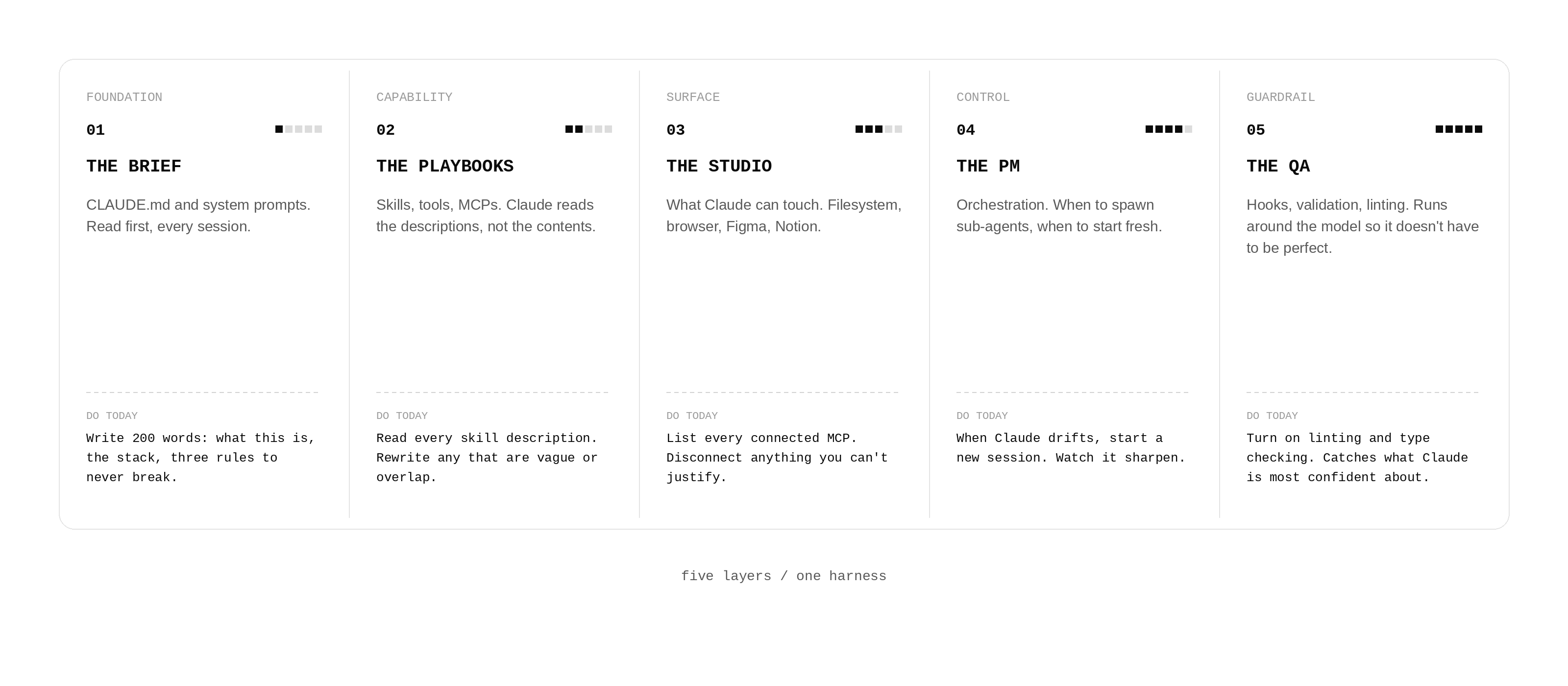
Each layer below goes into what it is, why it matters, and how to use it.
1. The brief: CLAUDE.md
The first thing Claude reads, every session. The project briefing.
What it is: A long-term memory file for the AI.
Why: Coding AI agents have a “context window.” They eventually forget early decisions. This forces the agent to “re-read the manual” before touching your code.
How I use it: Portfolio Pal’s CLAUDE.md is just 15 lines.
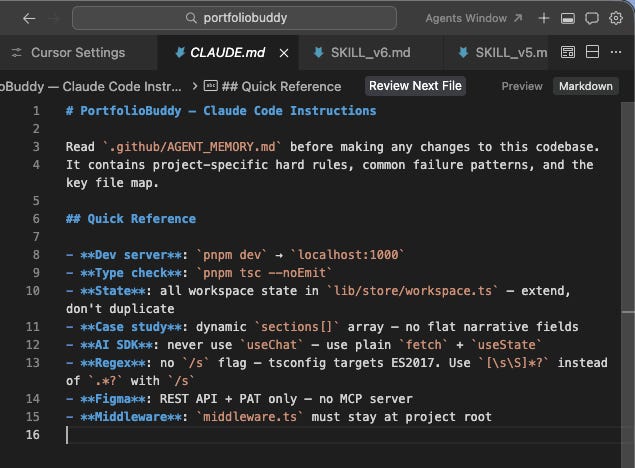
Example: 📑 Diving into the claude.md, it says: “Case study: dynamic sections[] array — no flat narrative fields”
What it is: Data Structure constraint.
Why: A “flat narrative” is just one big block of text (boring). A
sections[]array allows for modular design (e.g., Image section, then Text section, then Quote section). It makes the portfolio “bespoke.”
Try it: If your project doesn’t have a CLAUDE.md, write one. 200 words max. What the project is, what stack it uses, three rules to never break.
2. The playbooks: Skills, tools, MCPs
The second layer is everything reusable Claude can pull from: skills, tools, and MCP servers. These three words get used interchangeably online and it’s worth keeping them distinct, because they sit at different levels of your harness:
Tools are the basic actions Claude can take. Read a file, run a command, edit code.
Skills are reusable instructions co-written with a coding agent (Read more on leveling up on writing SKILL.md) a markdown file (
SKILL.md) that teaches Claude how to do a specific kind of task in a specific way. Your playbooks.MCP servers are external services Claude can call: Figma, Notion, Gmail, your custom API.
The thing worth knowing, and the thing most designers miss: Claude doesn’t read your skills. It reads your skill descriptions and decides which to load.
The description is the entire game. Vague description → loaded at wrong moments. Overlapping descriptions → Claude guesses wrong and uses the wrong one. Missing description → never loaded at all, even when it would’ve been perfect.
This is exactly like writing a good Figma component description, except instead of helping a teammate find the right component, you’re helping a model decide whether to load 800 tokens of instructions into its context.
My personal experience with MCP: I realized that I do not need to necessarily use Figma MCP, just REST API + PAT (This is because I keep hitting Figma MCP’s rate limit, and if I give my personal token access, it bypasses the rate limits and allows Portfoliopal to easily read my figma frames).
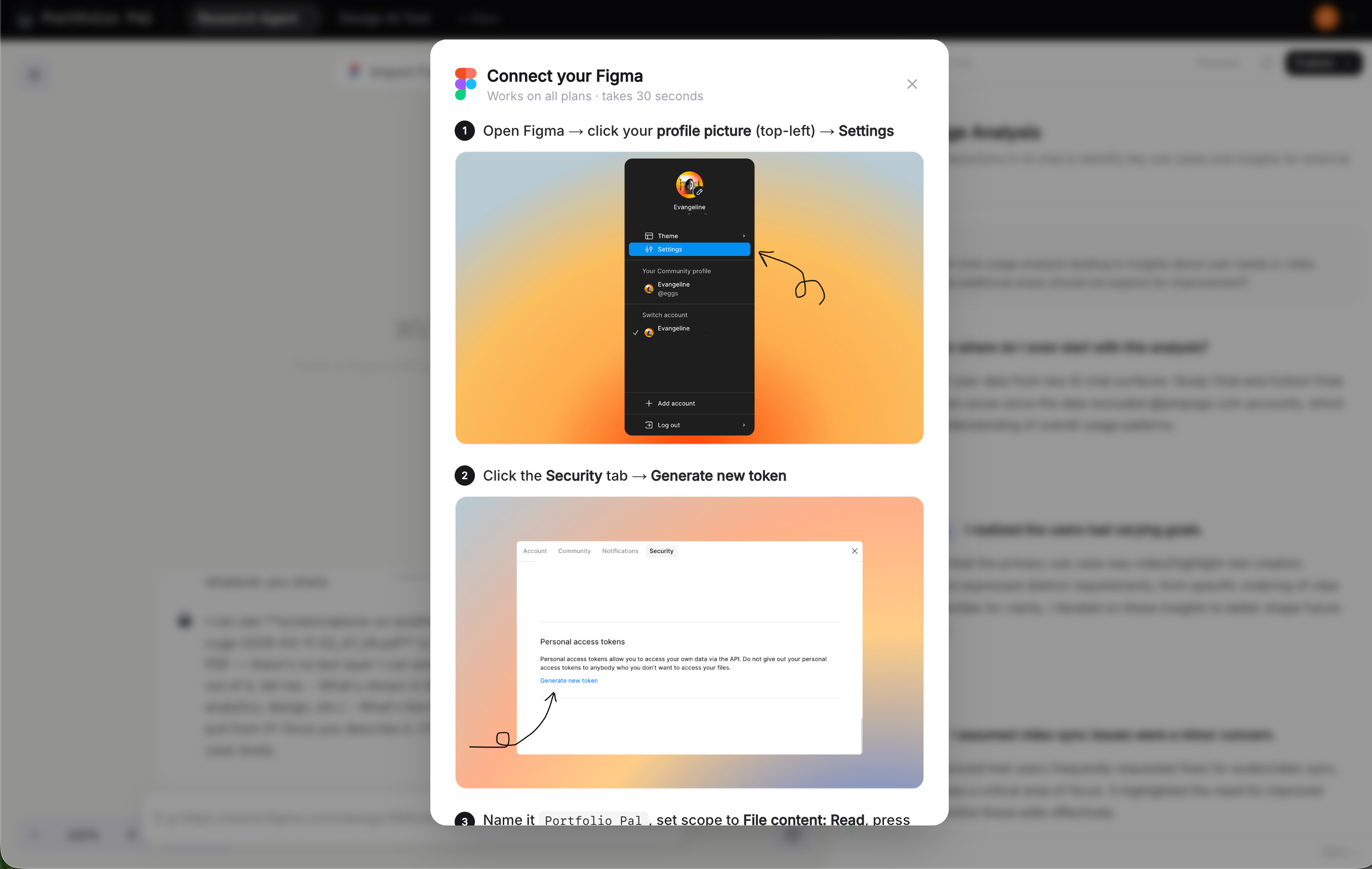
On MCPs, fewer is better. Every connected MCP adds tools to Claude's available set. More tools means more decisions for Claude to make every turn, and more chances for it to confidently pick the wrong one.
Try it: Open every skill you have and read just the description. Ask: if I were Claude, would I know exactly when to use this and when not to? Rewrite descriptions before you touch the skill content.
3. The studio: What Claude can touch
Filesystem. Browser. Terminal. Figma. Notion. Gmail. Each is a surface where Claude can confidently do the wrong thing.
How I use it: I disconnected three MCPs last weekend. Claude got noticeably sharper. More tools is not better.
Try it: List every connected MCP. For each one, ask: am I actually using this, or did I add it because someone said it was cool?
4. The project manager: orchestration
The fourth layer is about who holds what context. By default, one Claude holds everything, the brief, the bug you debugged, screenshots… Context fills up. Your intent gets drowned out by recent noise. Claude doesn’t implement features the way you asked it to.
The fix is sub-agents. A sub-agent is a separate Claude that runs in its own fresh context window, does one bounded task, and returns a summary. Think of them as browser tabs for your Claude session, a place to chase a tangent without losing the main thread.
How to spawn one? Just ask explicitly. Claude Code is conservative by default and won’t spawn sub-agents unless you ask. The trigger is being explicit about parallelism and scope. Two prompt patterns I use constantly:
Parallel exploration (when you need to understand something across files):
“Use sub-agents in parallel to explore this. Sub-agent 1: [task A]. Sub-agent 2: [task B]. Sub-agent 3: [task C]. Each returns a 5-bullet summary, not full file contents.”
Delegated work (when you want a focused task done without polluting your main context):
“Spin up a sub-agent to [task]. Return only the final result, no intermediate work.”
The single biggest leverage point: specify what the sub-agent returns. Without it, sub-agents dump everything they read back into your main context and the whole point is defeated. Always say what shape you want back: “5 bullets,” “file paths only,” “the diff and nothing else.”
The phrases that reliably trigger sub-agent spawning:
“Use sub-agents in parallel to...”
“Spin up sub-agents to...”
“Have a separate agent...”
“Use 3 parallel tasks to...”
Feedback Loop
In a harness, a feedback loop transforms a “one-and-done” response into a self-correcting system. In the context of PortfolioPal, this acts as a “sanity check” between the Writer and the Verifier.
lib/agents/verifier.tsis a second AI call that fact-checks the case study after Portfoliopal writes it. It catches: hallucinated metrics ("increased revenue by 100K" when user didn’t mention it), generic phrases that don't match the conversation, claims with no evidence.
How I’m using it:
The Writer (Portfoliopal): Takes designer’s figma frames, docs, brain dump and turns it into a case study.
The Verifier: Compares that draft against your original brain dump to ensure it stays truthful.
The Verifier checks for “AI fluff” or made-up statistics. If the Verifier catches a hallucination, like a fake “20% conversion increase” you never mentioned, the harness triggers a loop, sending the draft back to the Writer with specific instructions to fix the error before the final, authentic version ever reaches your portfolio preview.
5. The QA layer: Hooks, middleware, validation
The layer that catches mistakes before your users (in this case for portfoliopal.co, my users are designers) ever see the generic AI copywriting. Since AI can be unpredictable, the QA layer makes the system feel professional and “bespoke” instead of AI-speak or buggy.
Example: Linting. Its automatically scanning code for stylistic errors or misfits (e.g., a variable created but never used).
How I use it: In PortfolioPal, When the AI finishes “mining” a case study, a hook automatically triggers a Cleanup script.
The easiest QA layer to add for designers without writing real code is to add Zod schema validation.
Example prompt:
“I want to implement Zod schema validation for the AI’s output. Create a
schema.tsfile that defines exactly what a ‘Case Study’ looks like (Title, Role, Problem, Solution). Then, update the AI prompt logic to ensure it returns JSON that matches this schema perfectly. If it fails validation, write a function to ‘retry’ the prompt with the error message.”
Why this frame is useful
You don’t need all five layers built out. You need to know they exist, so you can locate the failure when something breaks.
For me, the shift was: I stopped spamming Claude Code with “this doesn’t work, not expected, pls fix” and started asking “which layer of my harness needs work?” The first question has no clear answer. The second one usually does.
I simply think of it as how can I share more common language and terms with my coding agent?
This is also how I’m building Portfolio Pal underneath! The product looks like a brain-dump-to-case-study tool. Underneath, it’s a harness, a system prompt that coaches like a design lead, tools that pull context at the right moment, hooks that validate, orchestration that knows when to ask vs. when to draft. The model is the engine. The harness is what makes it useful.
That’s where I’m at right now. The frame might evolve. The five layers might compress to three or expand to seven. But thinking in layers, instead of in skills has been the a useful shift I’m still experimenting with.
Try this week: Work with claude code to write a CLAUDE.md for whatever you’re building, ask it to ask you questions on what your intent is, what you want to build and achieve. Watch how much sharper the first response of a fresh session gets.
Curious what other designers are running into, drop a comment and I’ll reply and write more in the next post!
Build your own AI-Native Portfolio
I’m looking for a few people who want to build their own AI-Native Product Designer Portfolio.
Join the waitlist at www.portfoliopal.co ٩(^ᗜ^ )و ´-
and I’ll get in touch! You’ll be able to brain dump your Figma files, docs, threads privately → get it audited → have a Strategic Narrative → Live Portfolio Site 🎉